
To record a lecture on iPhone, ask the lecturer first, then open Voice Memos (in the Utilities folder), put the iPhone face up near the front and tap Record. Do not play any audio until you tap Done: Voice Memos stops when another app plays sound. Afterwards, tap More, then View Transcript for the free transcript on iPhone 12 and newer. On iPhone 15 Pro and newer, Apple Intelligence can summarize it.
Which way to record a lecture on iPhone
| You want | Use | Cost |
|---|---|---|
| The lecture as audio | Voice Memos | Free |
| Audio next to your own typed notes | Notes, Record Audio | Free |
| A transcript | Voice Memos or Notes, iPhone 12 and newer, 10 languages | Free |
| A summary | Apple Intelligence, iPhone 15 Pro and newer | Free |
| Transcript, lecture summary, tasks and search in one place, offline | An app such as NotizPro | Free plan 300 min a month; Pro $1.99 a week, $4.99 a month or $29.99 a year |
Apple’s own guide names classroom lectures as one of the things Voice Memos is for, so you do not need an extra app to record one. Every Apple step below was checked against Apple’s iPhone User Guide for iOS 27.
Before you record: ask first
Check that your school and your lecturer allow recording before the class starts. Many universities have a rule for it, and some lecturers say no for guest speakers or for discussion parts. A short “Is it OK if I record the lecture for my notes?” settles it. If the answer is no, do not record.
How to record a lecture on iPhone with Voice Memos
- 1Open Voice Memos. It is in the Utilities folder; move it to your Home Screen if you record every week.
- 2Put the iPhone face up on the desk, as close to the lecturer as you can, with the bottom microphone uncovered.
- 3Tap the Record button. Tap Pause for a break, then Resume.
- 4Tap Done at the end. Tap the title and rename it, for example “Biology 101, week 6”.
Three settings matter in a lecture hall:
- Silent mode mutes the start and stop tones. Turn it on before you tap Record, so the room does not hear it.
- Voice Isolation filters out background sound. While Voice Memos records, open Control Center, tap Voice Memos at the top and choose Voice Isolation. It helps in a hall full of rustling and coughing.
- Other apps are fine as long as they stay silent. Apple says Voice Memos stops when another app starts playing audio. Opening a video or a voice message during the lecture ends the recording.
Record in Notes if you also want to type
- 1In Notes, open a note for the course.
- 2Tap the Attachments button (the paper clip), then Record Audio, then Record.
- 3To type while it records, swipe down from the top of the recording screen.
The audio, the transcript and your own notes stay in one note. That suits a lecture with slides: you write the slide titles, and the recording keeps everything the lecturer said.
How to turn a lecture recording into notes
On iPhone 12 and newer, Voice Memos and Notes transcribe a recording in English, Spanish, Portuguese, Italian, French, German, Japanese, Korean, Simplified Chinese and Traditional Chinese. Apple says it is not available in every country or region.
- During the lecture: swipe up from the top of the waveform and tap the transcript button to read along.
- After the lecture: tap the recording, tap More (•••), then View Transcript or Copy Transcript.
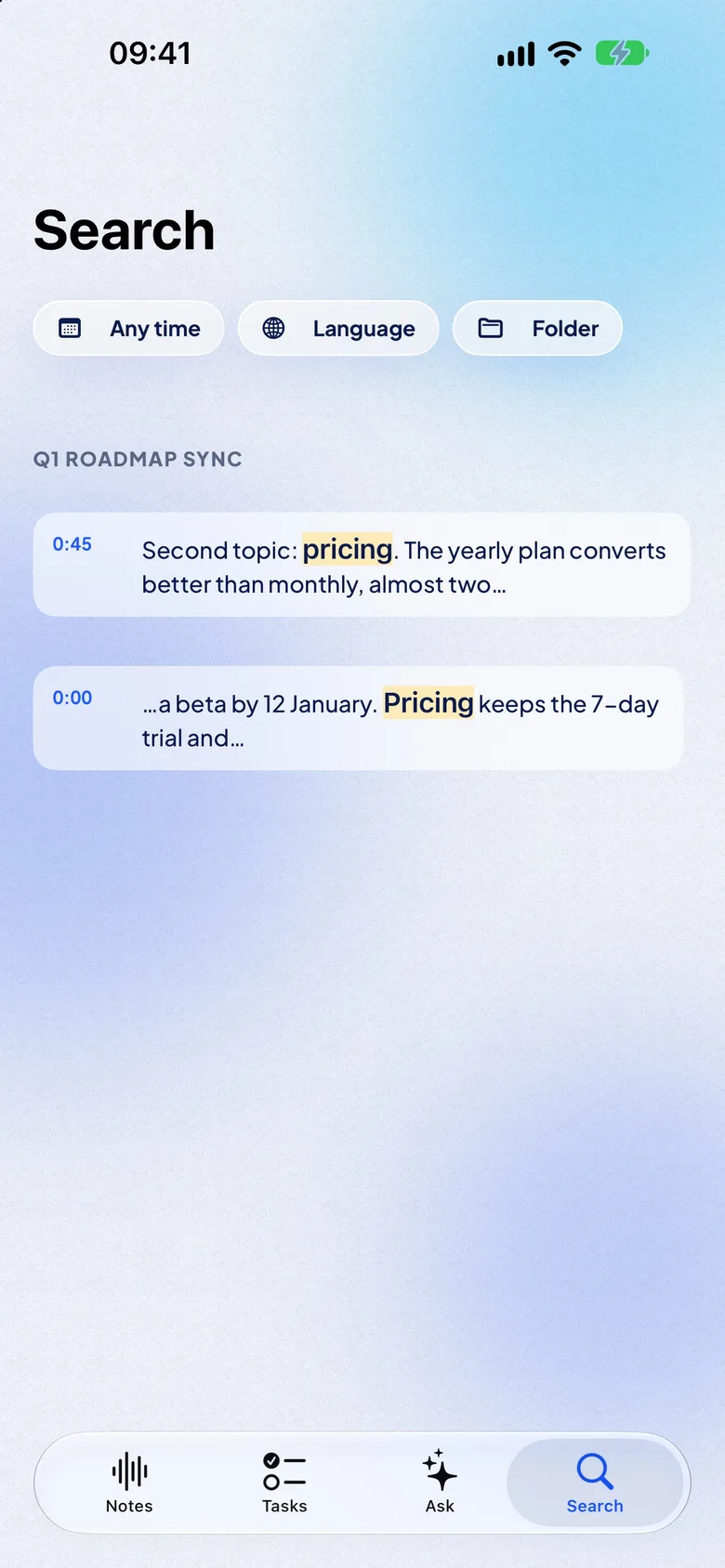
- Find a topic later: search in Voice Memos. It matches words in transcripts as well as titles, and tapping a word moves the playhead to that point in the audio.
For a summary, you need Apple Intelligence: iPhone 15 Pro and newer. In Notes, tap the recording, then Summary. In Voice Memos, select the transcript and use Writing Tools. The steps, and what to do on an older iPhone, are in how to summarize a voice memo on iPhone. Saving the transcript as a Word or PDF file is in how to transcribe voice memos on iPhone.
Review a lecture in half the time
Before an exam you rarely want to hear all 90 minutes again. In Voice Memos, tap the recording, tap the options button, then:
- Playback speed: drag the slider toward the rabbit to play faster.
- Skip Silence: jumps over the pauses, for example while the lecturer writes on the board.
- Enhance Recording: reduces background noise and echo when you play it back.
Skip Silence and Enhance Recording work on Mono and Stereo recordings; on iPhones that record Spatial Audio, Studio Sound does the same job. They change playback only, not the recording. The fastest route is still the transcript: search it for the term from the exam question, tap the word and listen from there.
Tips for a lecture recording you can use
- Sit near the front. Apple’s advice for the recording level is to move the microphone closer. Ten rows back, the quiet asides are gone.
- Do not cover the microphone with a notebook or a sleeve.
- Use an external microphone in a big hall. Voice Memos records from a supported headset or external microphone too.
- Turn on Do Not Disturb, so a call or a voice message does not tempt you to play audio and stop the recording.
- Check battery and storage before a double lecture.
- For an online lecture on the same iPhone, Voice Memos cannot record it, because the lecture app plays audio. See the Zoom and Teams part of how to record a meeting on iPhone.
With NotizPro
NotizPro is our app. It records the lecture and writes the notes for you, on the iPhone: no account, no upload, and it works offline, which helps in a basement lecture hall with no signal.
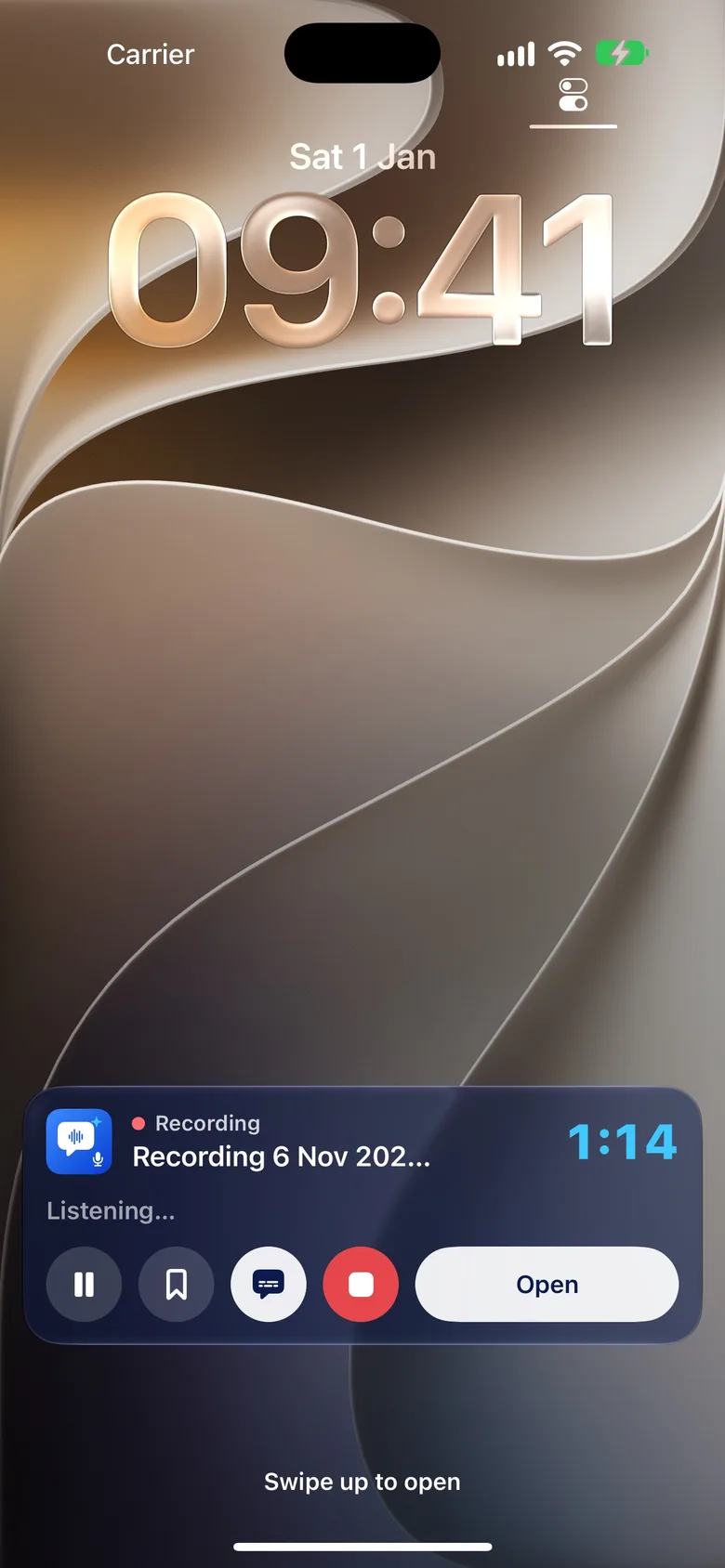
- 1Tap Record. It keeps going with the screen locked or while you use other apps, and the audio is saved every minute.
- 2Tap Highlight when the lecturer says “this will be in the exam”: it marks the last 15 seconds. Take a photo of the board during the recording, and it is pinned to that moment; the text in the photo becomes searchable.
- 3Tap Stop. The transcript is ready seconds later, in the lecture’s language, with paragraphs and word timing.
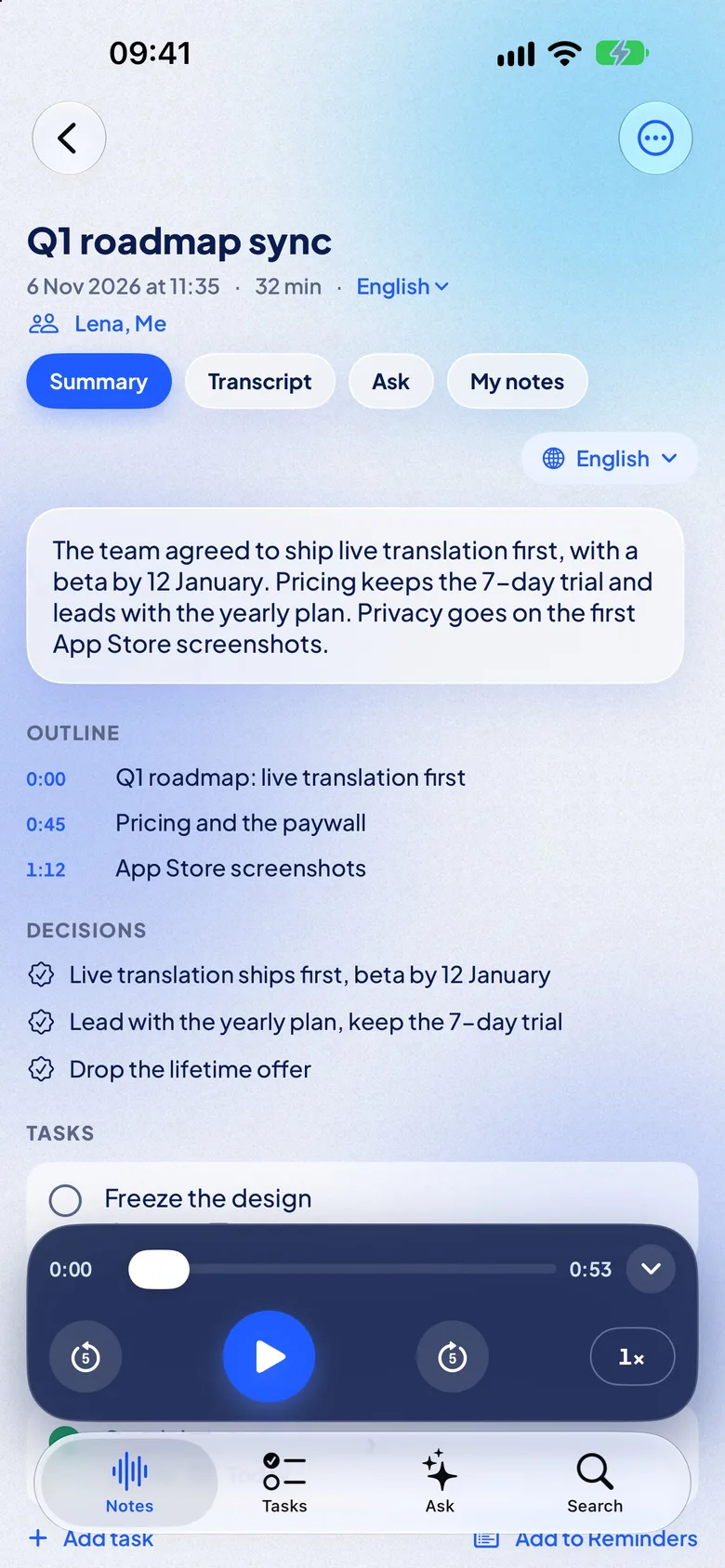
- 4Pick the lecture summary style for an overview and an outline with times you can tap, plus the tasks (“read chapter 4 by Friday”).
A lecture you already recorded in Voice Memos works too: tap the recording, tap Share, then NotizPro. On Free, an imported file can be up to 30 minutes; a longer one can be trimmed to 30 minutes on import. Pro imports any length.
What a lecture costs in minutes on each plan:
| Lecture | Free (300 min a month, 30 min per recording) | Pro |
|---|---|---|
| 50 minutes | Two parts (30 + 20 min), one conversation; 50 of 300 min | One recording, no limit |
| 90 minutes | Three parts; 90 of 300 min | One recording, no limit |
| 90 minutes, twice a week (about 9 a month) | About 3 lectures a month, then the audio waits for the 1st | Unlimited |
| Price | Free | $1.99 a week, $4.99 a month or $29.99 a year; 7 days free |
The limits, plainly:
- Free stops each recording at 30 minutes. A banner warns at 25 minutes; at 30 the part is saved and one tap starts Part 2, and both parts stay one note. Pro has no limit per recording.
- Out of free minutes, the audio is kept, but the transcript waits for the 1st of the next month, or for Pro.
- Written AI summaries need Apple Intelligence (iPhone 15 Pro and newer) or a one-time AI pack download of about 650 MB. Without either, the summary is built from key sentences.
- 21 spoken languages. 12 work with Apple’s built-in speech recognition; 9, including Russian, Ukrainian, Polish, Dutch and Turkish, need a speech model you download once. See which languages.
- Live translation while you record is Pro. For a lecture in a language you follow less well, see live translation. Translating a finished note is free.
FAQ
Can I record a lecture on my iPhone?
Yes. Voice Memos is free, already on every iPhone, and Apple lists classroom lectures as one of its uses. Ask your lecturer first.
What is the best way to record a lecture on iPhone?
Sit near the front, turn on Silent mode, start Voice Memos, put the iPhone face up on the desk and choose Voice Isolation in Control Center. Do not play any audio on the iPhone until you tap Done.
Will my iPhone stop recording if I open another app?
Not if the other app is silent. Voice Memos stops only when another app starts playing audio, for example a video or a voice message.
Can I turn a lecture recording into notes for free?
Yes, on iPhone 12 and newer in one of the 10 languages Apple lists: the transcript is free in Voice Memos and Notes. A free summary needs Apple Intelligence, on iPhone 15 Pro and newer.
How long can a lecture recording be?
Apple’s guide gives no time limit for Voice Memos; battery and storage are what run out. Check both before a double lecture.
Can I record a lecture in a language Voice Memos cannot transcribe?
You can record it, but the free transcript covers only the 10 languages Apple lists. NotizPro transcribes 21 on the iPhone, some after a one-time download.