
Voice Memos writes a free transcript on iPhone 12 and newer. On iPhone 15 Pro and newer, select the transcript and use Apple Intelligence Writing Tools to summarize it. On other iPhones, paste the transcript into an AI assistant. On an iPhone without Apple Intelligence, including iPhone 11, an app like NotizPro can write both the transcript and the summary on the iPhone.
What your iPhone needs for a transcript and a summary
Apple splits the job in two. Voice Memos turns speech into a transcript, and Apple Intelligence, Apple’s built-in AI, writes the summary. The two have different requirements.
| Transcript | AI summary | |
|---|---|---|
| iPhone | iPhone 12 or later | iPhone 15 Pro, iPhone 15 Pro Max, or iPhone 16 and later |
| Languages | English, Spanish, Portuguese, Italian, French, German, Japanese, Korean, Simplified and Traditional Chinese | 16 languages, set as both device and Siri language |
| Cost | Free | Free; Apple notes that usage limits may apply |
| Where | Not in all countries or regions | Not in all languages or regions |
Sources: Apple’s guides to viewing a Voice Memos transcription and Writing Tools, iOS 27.
Older recordings are covered too. Apple says that when you open a recording made on iOS 17 or earlier, Voice Memos transcribes it automatically, as long as it contains speech.
The free way: Voice Memos and Apple Intelligence
Use this for a recording you already have.
- 1Open Voice Memos. If it is not on your Home Screen, look in the Utilities folder.
- 2Tap the recording, tap the More button (•••), then choose View Transcript.
- 3Select the part you want summarized, or the whole transcript.
- 4Tap Writing Tools, then choose Summarize for a short paragraph or Key Points for a bulleted list.
- 5Copy the result into Notes or a message.
Before you share the result, check it against the recording. An AI summary can drop or misstate a detail, and Apple publishes no accuracy figure. Apple also gives no maximum length for Writing Tools, so for a two-hour lecture check that the summary covers the end as well as the start. If it does not, summarize the transcript in parts.
Record in Notes and get the summary in one tap
If you have not recorded yet, start in Notes. It keeps the audio, the transcript and the summary together in one note.
- 1Open Notes and create a new note.
- 2Tap the attachment button (the paper clip), then tap Record Audio, and start recording.
- 3When you finish, tap the recording, then tap Summary.
To copy or share the summary, tap the button at the top of it. If you speak more than one language, note one detail from Apple’s guide to recording and transcribing audio in Notes: transcription depends on the device language being one of the 10 transcription languages above.
Recorded phone calls land in Notes too, in a Call Recordings folder with a transcript and, with Apple Intelligence, a summary. Apple says the call transcript identifies each speaker, and both people hear a notice that the call is being recorded. Call recording is not offered in the European Union and several other countries, per Apple’s call recording guide.
No Apple Intelligence? Use the free transcript
On an iPhone without Apple Intelligence, such as an iPhone 13 or iPhone 15, you still get the transcript for free (see how to transcribe voice memos on iPhone). You only need somewhere to summarize it.
- 1In Voice Memos, tap the recording, tap More, then Copy Transcript.
- 2Paste it into an AI chat assistant you already use.
- 3Ask for a specific result, not just “summarize this”.
The trade-off is privacy: the full transcript goes to that company under its terms. Check its data settings, and keep confidential work recordings out unless your employer allows the tool.
Where the free route stops
For an occasional memo, Apple’s tools may be all you need. They fall short in four places:
- Hardware: summaries need an iPhone 15 Pro or later. Other models from iPhone 12 on get the transcript only, and iPhone 11 and iPhone SE (2nd generation) get no transcript.
- Language: transcription covers 10 languages. Dutch and Turkish, for example, are Apple Intelligence languages but are not on the transcription list.
- Speakers: Apple documents speaker labels for recorded phone calls. Its guides to Voice Memos and Notes recordings do not mention them, so plan on telling speakers apart yourself in an interview or a meeting.
- Structure: Summarize gives a general summary. If you want the same layout every time, such as overview, decisions and action items, you ask for it again for every recording.
When an app is worth it
A summary is only as good as the transcript under it. A voice notes app earns its place when one of these is true:
- Your iPhone has no Apple Intelligence, and you want the summary written on the iPhone instead of by an online assistant.
- You want the same layout every time: overview, decisions and tasks with who does what by when.
- Your iPhone is an iPhone 11 or iPhone SE (2nd generation), which gets no Voice Memos transcript.
- The meeting is in a language you read less well, and you want the transcript in your own language before you summarize it.
- You record meetings or lectures several times a week and want to search all of them later.
- You need the transcript as a file: PDF, Markdown or subtitles, with timestamps.
Before you pick one, check where it processes your audio; the privacy policy should name the companies. Then compare the free minutes, whether it imports Voice Memos recordings, what it exports, and whether it writes a summary itself or leaves that to you.
With NotizPro
NotizPro is our app. It writes the transcript and the summary on the iPhone, for free, so you do not copy text into another app.
- 1Record in NotizPro, or open a memo in Voice Memos, tap Share, then NotizPro. Any app that shares an audio or video file works the same way.
- 2Read the transcript live while you record. Seconds after you tap Stop, the accurate version follows, with punctuation, paragraphs and the time of every word.
- 3Open the Summary tab: an overview, an outline with times, the decisions, and the tasks with owner and due date. Tap Add to Reminders to send the tasks to Reminders.
- 4Open the Ask tab and ask a question, such as “What did we decide?”. The answer shows the minute it comes from.
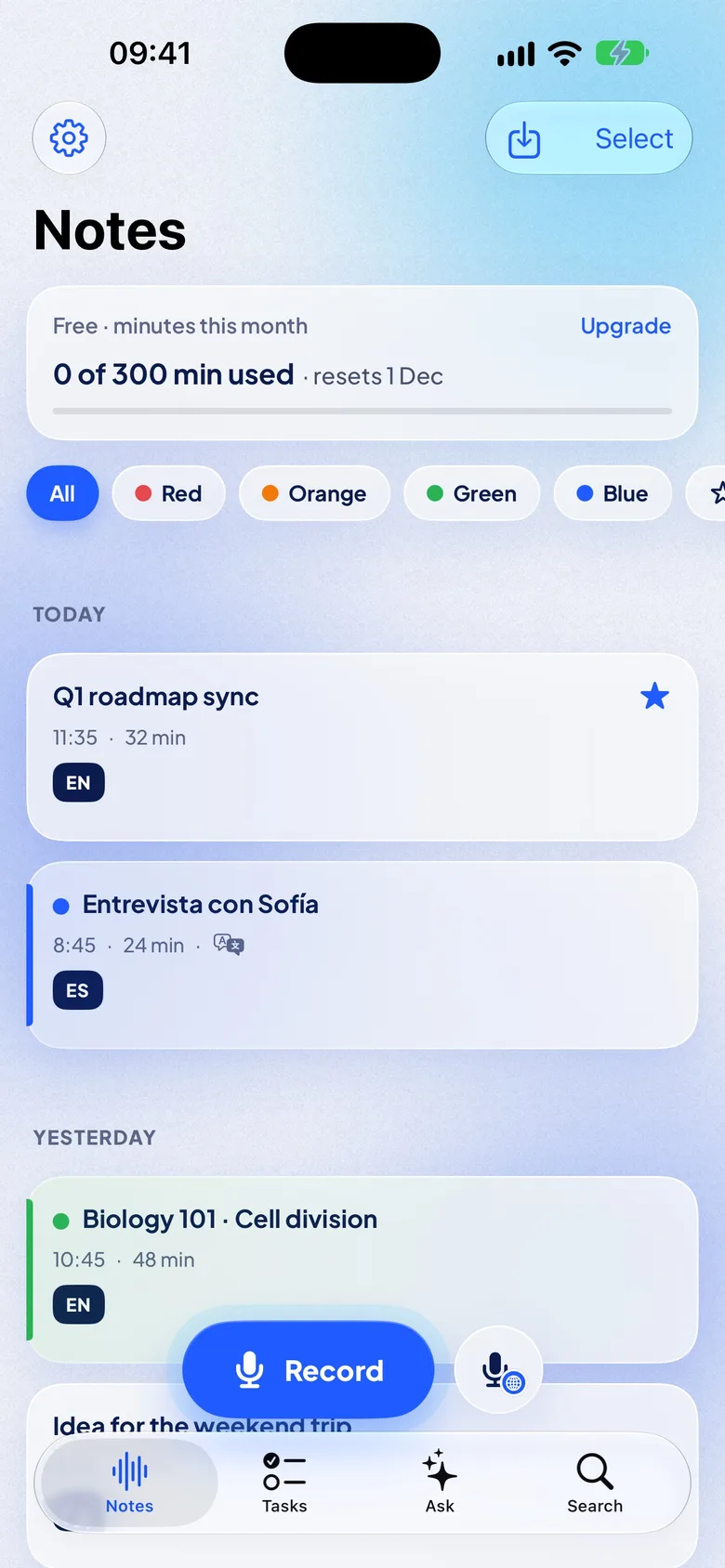
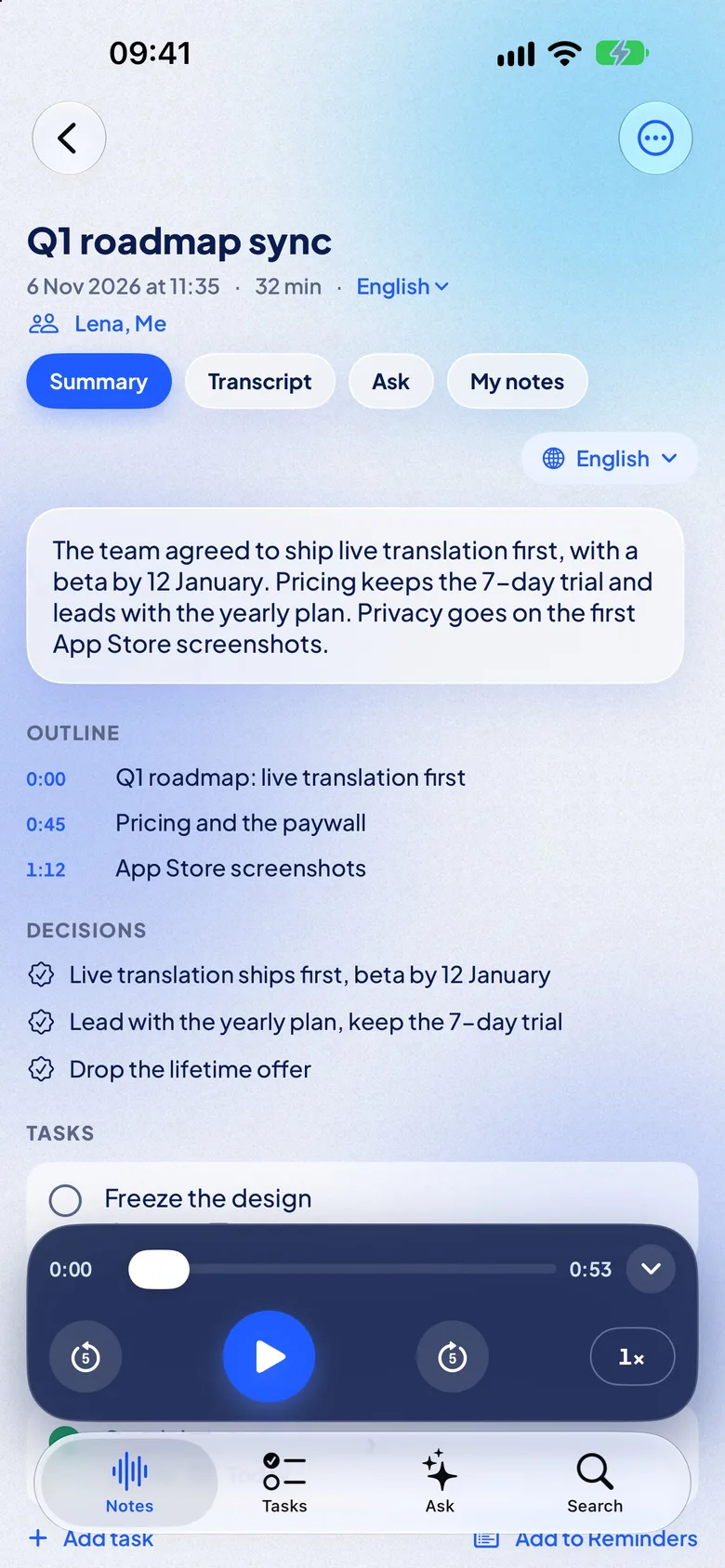
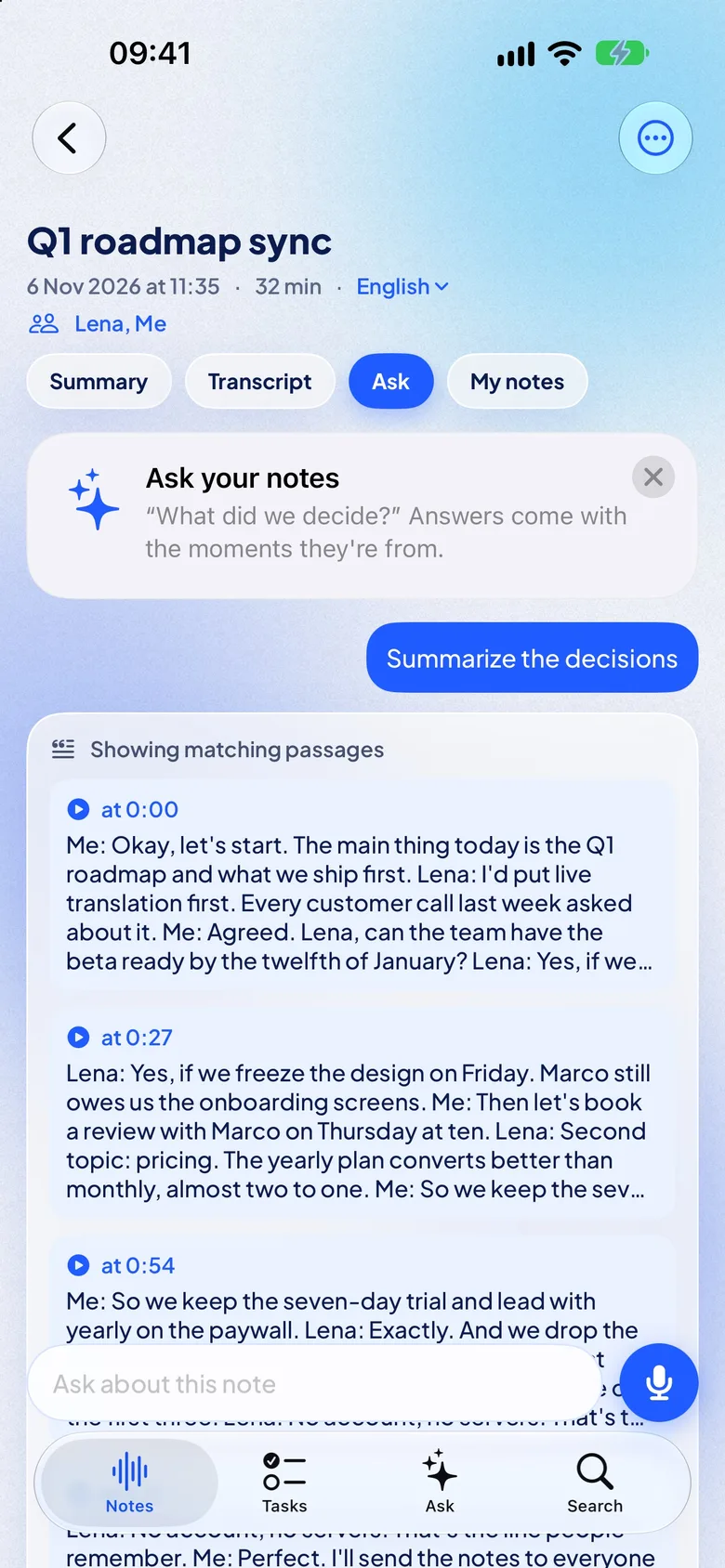
On iPhone 15 Pro and newer, NotizPro writes the summary with Apple Intelligence. Other iPhones download the AI pack once, about 650 MB. Without either, you get a summary made of the key sentences. Nothing is sent to a server.
- Styles: pick meeting, lecture, interview or voice memo, and get the summary in another language if you like.
- Across notes: Ask NotizPro answers from all your notes and shows the source note and minute. The Tasks tab collects the tasks from every note, with deadlines.
- Speakers: the note lists who spoke and for how long; rename them from Contacts.
It transcribes on the iPhone, on iPhone 11 and newer with iOS 26, in 21 languages: English, German, French, Spanish, Italian, Portuguese, Dutch, Polish, Ukrainian, Russian, Turkish, Swedish, Finnish, Japanese, Korean, Chinese (Mandarin), Cantonese, Indonesian, Malay, Thai and Vietnamese. Twelve are built into iOS with nothing to download; the other nine need a one-time download, and Turkish, Swedish, Finnish, Malay and Vietnamese need an iPhone with 6 GB of memory or more.
With Pro, live translation shows each sentence in your language about 2 seconds after it is spoken, and the note keeps both languages. Translating a finished note is free for everyone.
The limits, plainly:
- The summary depends on your iPhone. The key-sentences summary, used without Apple Intelligence or the AI pack, is plainer. Check any summary against the recording.
- The summary stays in the app. Export covers the transcript and audio; copy the summary with Copy summary.
- Free has limits. 300 minutes a month, 30 minutes per recording (then Continue as Part 2), and imports up to 30 minutes per file.
- iPhone only. It needs iOS 26 or later: iPhone 11 and later, iPhone SE (2nd generation) and later.
- No published accuracy figure. Test it on a recording you know well.
There is no account. The transcript, the summary and Ask run on the iPhone, and the audio stays there unless you export it. With Pro, iCloud sync carries notes, transcripts, summaries and tasks to your other devices; the audio stays on the iPhone that recorded it.
Which way fits you
| Voice Memos + Apple Intelligence | NotizPro | |
|---|---|---|
| Cost | Free | Free 300 min a month; Pro $1.99 a week, $4.99 a month or $29.99 a year, 7 days free |
| Summary | Writing Tools, on iPhone 15 Pro and newer | Free, in the app: Apple Intelligence on iPhone 15 Pro and newer, the AI pack (about 650 MB) on other iPhones |
| Decisions and tasks | Ask for them each time | In every summary, tasks with owner and due date; Add to Reminders |
| Questions | — | Ask a note or all notes; answers show the note and minute |
| Transcript on | iPhone 12 and newer | iPhone 11 and newer, with iOS 26 |
| Languages | English, Spanish, Portuguese, Italian, French, German, Japanese, Korean, Chinese | 21, including Dutch, Polish, Ukrainian, Russian and Turkish; 12 built in, 9 with a one-time download |
| Live translation | — | Pro, about 2 s after each sentence |
| Long recordings | Summarize in parts | Free: 30 min, then Part 2; Pro: no limit |
| Export | Copy the text, no timestamps | Text, Markdown, PDF, SRT, VTT, audio, with or without timestamps; copy the summary |
FAQ
Can an iPhone summarize a voice memo without an app?
Yes, if it supports Apple Intelligence: open the transcript in Voice Memos and use Writing Tools. On other iPhones, copy the free transcript into an AI assistant.
Why don’t I see a transcript in Voice Memos?
Transcripts need an iPhone 12 or later, a supported language, and a supported country or region. For recordings in Notes, Apple also requires the device language to be one of the supported languages. Our troubleshooting guide has the full checklist.
Which iPhones can summarize voice memos?
On iOS 27: iPhone 15 Pro, iPhone 15 Pro Max, and iPhone 16 or later, with Apple Intelligence turned on.
Can I summarize an old voice memo?
Yes. Apple says Voice Memos transcribes recordings from iOS 17 or earlier when you open them, if they contain speech. Then use Writing Tools. You can also share the memo to NotizPro, which transcribes and summarizes it on the iPhone.
Does Voice Memos tell speakers apart?
Apple’s Voice Memos guide does not mention speaker labels. Apple documents them only for recorded phone calls.
Is summarizing a voice memo private?
Apple says many Apple Intelligence requests run on the device, and complex ones go to Private Cloud Compute, where data is not stored or made accessible to Apple. See Apple Intelligence and privacy. NotizPro transcribes and summarizes on the iPhone, sends nothing to a server and has no account. AI assistants process your text on their servers, so read their privacy policies.
Does NotizPro summarize recordings?
Yes, for free, on the iPhone: an overview, an outline with times, decisions, and tasks with owner and due date. It uses Apple Intelligence on iPhone 15 Pro and newer and the AI pack (about 650 MB) on other iPhones; without either, it summarizes the key sentences.
How do I get the audio file out of Voice Memos?
Tap the recording, tap More, tap Share, then Save to Files. You get an .m4a file by default, per Apple’s export guide.